top of page

PropEd
Teaches Users About Managing Real Estate Properties


Role
UX/UI Design
User Research

Tools
Figma
Maze

Timeline
January 2026 - March 2026
Prototyping
Usability Testing
Overview
Summary
PropEd is an application that provides users a straightforward way to learn about managing real estate properties while keeping them invested in the learning process. It has a learning experience that feels simple and enjoyable to get through. The application uses a reward system (i.e., keys) to help users unlock new features and resources, which can be acquired by completing courses. Target users include young to middle-aged adults who want to retire early and build generational wealth.
Key Takeaways:
-
Conducted a usability test to improve the user interface screens.
-
Gathered feedback to improve the application's features.
-
Next steps include iterating on the app to make it more accessible.
Problem: unable to retire early and spend time with family
Young and middle-aged individuals cannot afford to spend time with their family and are unable to rest easy due to burnout from work. Many of them would like to retire early and want to learn about real estate properties to retire early and build generational wealth but are unsure about where to start. Moreover, various educational platforms do not have a streamlined and engaging way to learn about investment properties. There is a need for a platform that teaches individuals about how to manage real estate properties in a seamless and enjoyable way.
Introducing PropEd: an educational app on real estate
PropEd gives learners an easy and engaging method for gaining knowledge on how to manage real estate properties. It eases users into learning the material, communicating with peers, and having advanced resources to calculate which properties are worth obtaining. Regarding the target audience, it will be for young to middle-aged adults who want to build generational wealth and spend more time doing other activities. The project's goals will be focused on creating a prototype while building a solid foundation when moving forward with the idea.
Research Process
Visualizing the user persona
To better understand the target users for the application, a persona had been visualized. Knowing about their motivations and needs will benefit the research and development process by implementing the right type of features. Furthermore, it will ensure the pain points are clearly listed to address potential issues the application may have. The persona made represents those who want to obtain passive income, spend more time with their family, and learn how to build generational wealth through rental properties.

The competitors of PropEd
Each competitor offers the learning essentials on real estate or provides crucial resources for better decision-making when buying properties and assets. Their central strengths include strong usability, smooth onboarding for newcomers, and help with making better choices when dealing with rental properties. Regarding the weaknesses, these are limited interactivity, little personalization, and a steep learning curve. The main opportunities for improvement revolve around making a communicative learning environment, engaging course structure, doing beginner courses without needing prerequisites, and having clearer information presented. These insights can help contribute to the development of an application that addresses the downsides of the competitors.


Summary of research findings

User needs center on wanting to build generational wealth.

Opportunities for making it accessible to learn real estate.

Implement tips into the app for earning passive income.

Have tools and resources for getting the right type of properties.
Prototyping
Low-fidelity Prototype
-
Visuals for the application have not been finalized at this part of the creation process.
-
Onboarding screens are simple and straightforward to get through.
-
Users can choose which properties they would like to learn about and have their needs tailored for a more personalized experience.

-
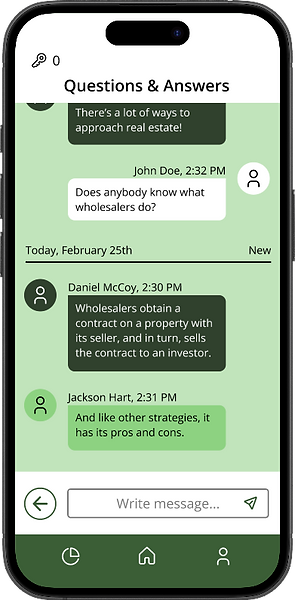
The community screens give users an opportunity to ask questions and get tips on how they can better approach their assignments.
-
Students and instructors can use the chat thread to interact with each other.
-
Specific chat threads are made to allow users to introduce themselves, ask questions based on the lessons, provide feedback on work, or have events and workshops.


-
Courses are simple to access and provide a visual indicator of how many lessons and modules are left.
-
The application will recommend new courses based on what the user answered in the onboarding.
-
Users can search for new courses in order to expand their knowledge in other parts.

The usability test results of PropEd; 5 participants
To ensure the application has a strong foundation for its core design, a usability test of 5 participants had been conducted. The online tool Maze has been utilized to gather results in the success rate, misclick rate, and the amount of time to complete a task. Various parts of the design would reveal how effective it was at finding and completing a course. In addition, it would be highlighting how simple and straightforward it would be to use the community feature.
Task #1: Complete your Real Estate Basics course

100.0% Direct Success
All users were able to find and finish the course they had been taking.

5.7% Misclick rate
Most participants had clicked on the right buttons.

36.6s Avg. duration
Total seconds to complete the task. It did not take too long to get through.
Task #2: Send a message through the Questions and Answers screen
100.0% Direct Success
All users managed to find the chat thread and send a message.
25% Misclick rate
Users were mainly unsure about where they needed to go.
24.8s Avg. duration
Total seconds to complete the task. It did not take too long to finish.
Feedback from the participants

The buttons and choices were very easy to follow and navigate without any issues that I can think of.

It was simple to figure out what to do and how to progress to the next screen.
Design System
Every design component gives the user necessary feedback on what is currently happening and provides them a simple method for accomplishing tasks. Furthermore, they help the foundational layout have clarity in defining what is considered an interactive feature or an appealing graphic asset.

Typography

Loading Animations

Color Palette

Default Button States

Hover Button States

Pressed Button States

Radio and Checkbox Buttons

Input Fields

Disabled Buttons

Iconography

Navigation
High-fidelity Prototype
Improvements
-
Added illustrations to the final version of the screens to increase user engagement.
-
Implemented distinct colors to make design elements stand out from the background and visuals.


Improvements
-
Made the course buttons fill up horizontally rather than vertically to make the progression system feel more satisfying.
-
Added illustrations to buttons to better visually communicate to users where they can find features and pages.
Improvements
-
Scaled down the text for the messages on the chat thread screen, making it easier to read the content.

Next Steps
The project will be designed and developed further so that the course structure is seamless for long-term usage. Future iterations will be made to enhance the application's layout and effectiveness. All lessons gained from the creation process are implementing crucial feedback into the designs and striking an excellent balance between all visual elements on the screens. If given more time, a higher number of page designs would have been made to determine what works best, streamlining the user flow of how courses are taken and users communicating with their peers. This would strengthen the accessibility for a more stable and engaging experience, reaching out to a broader audience.
.png)
bottom of page